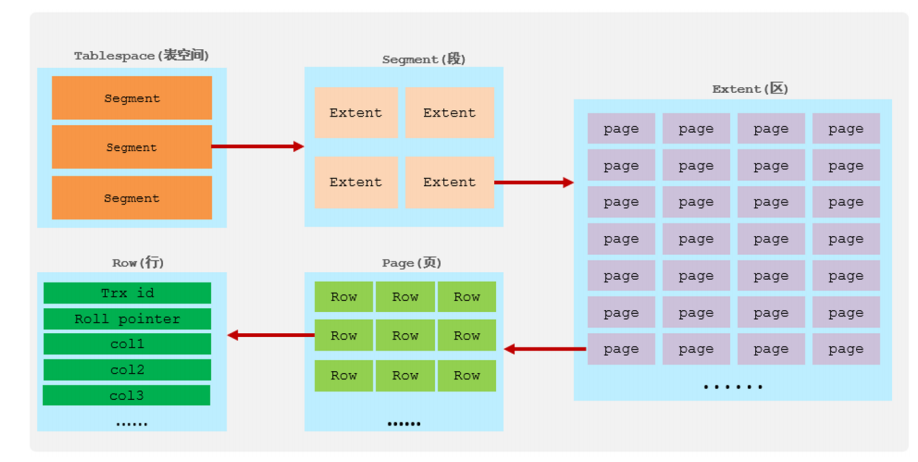
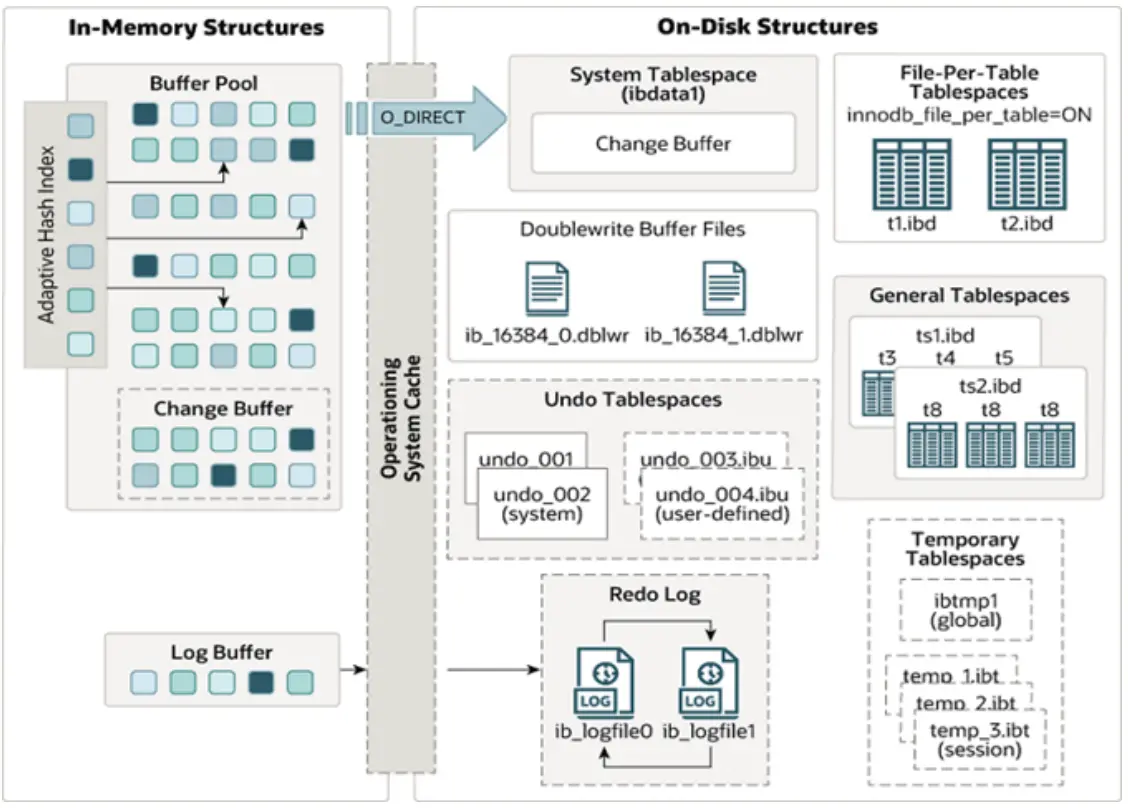
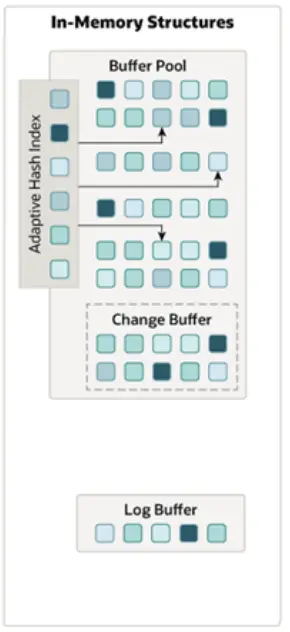
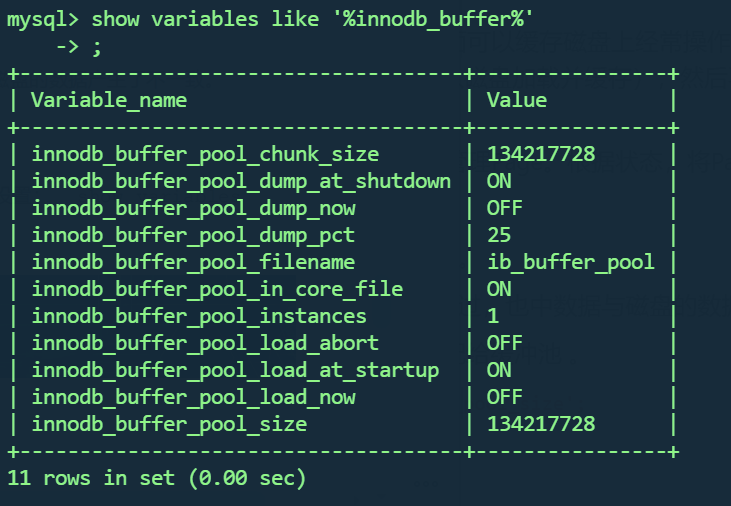
bash-4.4# cd /var/lib/mysql bash-4.4# ls '#ib_16384_0.dblwr' auto.cnf binlog.000006 client-cert.pem mysql server-cert.pem '#ib_16384_1.dblwr' binlog.000001 binlog.000007 client-key.pem mysql.ibd server-key.pem '#innodb_redo' binlog.000002 binlog.000008 ib_buffer_pool mysql.sock sys '#innodb_temp' binlog.000003 binlog.index ibdata1 performance_schema test 1a6408917011-slow.log binlog.000004 ca-key.pem ibtmp1 private_key.pem undo_001 1a6408917011.err binlog.000005 ca.pem ittest public_key.pem undo_002 bash-4.4# cd test/ bash-4.4# ll bash: ll: command not found bash-4.4# ls -l total 4388932 -rw-r----- 1 mysql mysql 114688 Dec 28 13:39 account.ibd -rw-r----- 1 mysql mysql 114688 Jan 1 09:55 course.ibd -rw-r----- 1 mysql mysql 114688 Dec 28 09:15 dept.ibd -rw-r----- 1 mysql mysql 131072 Dec 28 09:15 emp.ibd -rw-r----- 1 mysql mysql 114688 Dec 27 08:25 employee.ibd -rw-r----- 1 mysql mysql 2409 Dec 29 13:04 my_memory_395.sdi -rw-r----- 1 mysql mysql 0 Dec 29 13:02 my_mysam.MYD -rw-r----- 1 mysql mysql 1024 Dec 29 13:02 my_mysam.MYI -rw-r----- 1 mysql mysql 2408 Dec 29 13:02 my_mysam_394.sdi -rw-r----- 1 mysql mysql 114688 Jan 2 04:33 question_detail.ibd -rw-r----- 1 mysql mysql 114688 Jan 2 04:33 question_practice_detail.ibd -rw-r----- 1 mysql mysql 114688 Dec 28 12:22 salgrade.ibd -rw-r----- 1 mysql mysql 114688 Jan 2 13:56 score.ibd -rw-r----- 1 mysql mysql 147456 Jan 2 14:54 stu.ibd -rw-r----- 1 mysql mysql 114688 Jan 1 14:39 student.ibd -rw-r----- 1 mysql mysql 147456 Dec 28 08:57 student_course.ibd -rw-r----- 1 mysql mysql 4492099584 Dec 30 14:13 tb_sku.ibd -rw-r----- 1 mysql mysql 196608 Jan 2 07:31 tb_user.ibd -rw-r----- 1 mysql mysql 131072 Dec 30 07:53 tb_user_edu.ibd -rw-r----- 1 mysql mysql 114688 Jan 1 15:10 tb_user_pro.ibd -rw-r----- 1 mysql mysql 131072 Dec 28 06:43 user.ibd -rw-r----- 1 mysql mysql 114688 Jan 2 04:33 user_profile.ibd
mysql>createtable a(id intprimary key auto_increment,name varchar(10)) engine=innodb tablespace ts_name; ERROR 1046 (3D000): No database selected mysql> use test; Reading table information for completion oftableandcolumn names You can turn off this feature toget a quicker startup with-A
Where command is a oneor more of: (Commands may be shortened) create databasename Create a new database debug Instruct server to write debug information to log drop databasename Delete a database andall its tables extended-status Gives an extended status message from the server flush-hosts Flush all cached hosts flush-logs Flush all logs flush-status Clear status variables flush-tables Flush all tables flush-threads Flush the thread cache flush-privileges Reload grant tables (same as reload) kill id,id,... Kill mysql threads password [new-password] Change old password tonew-password incurrent format ping Check if mysqld is alive processlist Show list of active threads in server reload Reload grant tables refresh Flush all tables andcloseandopen logfiles shutdown Take server down status Gives a short status message from the server start-replica Start replication start-slave Deprecated: use start-replica instead stop-replica Stop replication stop-slave Deprecated: use stop-replica instead variables Prints variables available version Get version info from server
root@0fefa199c84c:/var/lib/mysql/test# mysqladmin -u root -p version Enter password: mysqladmin Ver 8.0.31for Linux on x86_64 (MySQL Community Server - GPL) Copyright (c) 2000, 2022, Oracle and/or its affiliates.
Oracle is a registered trademark of Oracle Corporation and/or its affiliates. Other names may be trademarks of their respective owners.
Server version 8.0.31 Protocol version 10 Connection Localhost via UNIX socket UNIX socket /var/run/mysqld/mysqld.sock Uptime: 1hour52 min 55 sec
语法 : mysqlshow [options] [db_name [table_name [col_name]]] 选项 : --count 显示数据库及表的统计信息(数据库,表 均可以不指定) -i 显示指定数据库或者指定表的状态信息 示例: #查询test库中每个表中的字段书,及行数 mysqlshow -uroot -p2143 test --count #查询test库中book表的详细情况 mysqlshow -uroot -p2143 test book --count
示例:
A. 查询每个数据库的表的数量及表中记录的数量
1
mysqlshow -uroot -p --count
1 2 3 4 5 6 7 8 9 10 11 12
root@0fefa199c84c:/var/lib/mysql# mysqlshow -u root -p --count Enter password: +--------------------+--------+--------------+ | Databases | Tables | Total Rows| +--------------------+--------+--------------+ | information_schema |79|26860| | mysql |38|136298| | performance_schema |111|286253| | sys |101|5669| | test |2|6| +--------------------+--------+--------------+ 5rowsin set.
B. 查看数据库test的统计信息
1
mysqlshow -uroot -p test --count
1 2 3 4 5 6 7 8 9 10
root@0fefa199c84c:/var/lib/mysql# mysqlshow -u root -p test --count Enter password: Database: test +----------+----------+------------+ | Tables | Columns | Total Rows| +----------+----------+------------+ | employee |2|0| | stu |3|6| +----------+----------+------------+ 2rowsin set.
C. 查看数据库test中的stu表的信息
1
mysqlshow -uroot -p test stu --count
1 2 3 4 5 6 7 8 9 10
root@0fefa199c84c:/var/lib/mysql# mysqlshow -u root -p test stu --count Enter password: Database: test Table: stu Rows: 6 +-------+--------------+--------------------+------+-----+---------+----------------+---------------------------------+---------+ | Field | Type |Collation|Null| Key |Default| Extra | Privileges | Comment | +-------+--------------+--------------------+------+-----+---------+----------------+---------------------------------+---------+ | id |int||NO| PRI || auto_increment |select,insert,update,references|| | name |varchar(255) | utf8mb4_0900_ai_ci | YES ||||select,insert,update,references|| | age |int||NO||||select,insert,update,references|| +-------+--------------+--------------------+------+-----+---------+----------------+---------------------------------+---------+
D. 查看数据库test中的stu表的id字段的信息
1
mysqlshow -uroot -p1234 db01 course id --count
1 2 3 4 5 6 7 8
root@0fefa199c84c:/var/lib/mysql# mysqlshow -uroot -p test stu id --count Enter password: Database: test Table: stu Rows: 6 Wildcard: id +-------+------+-----------+------+-----+---------+----------------+---------------------------------+---------+ | Field | Type |Collation|Null| Key |Default| Extra | Privileges | Comment | +-------+------+-----------+------+-----+---------+----------------+---------------------------------+---------+ | id |int||NO| PRI || auto_increment |select,insert,update,references|| +-------+------+-----------+------+-----+---------+----------------+---------------------------------+---------+
root@0fefa199c84c:/var/lib/mysql# mysqldump -u root -p test >test.sql Enter password: root@0fefa199c84c:/var/lib/mysql# ls '#ib_16384_0.dblwr'0fefa199c84c.err binlog.index client-key.pem mysql public_key.pem test '#ib_16384_1.dblwr' auto.cnf ca-key.pem ib_buffer_pool mysql.ibd server-cert.pem test.sql '#innodb_redo' binlog.000001 ca.pem ibdata1 performance_schema server-key.pem undo_001 '#innodb_temp' binlog.000002 client-cert.pem ibtmp1 private_key.pem sys undo_002 root@0fefa199c84c:/var/lib/mysql# rm -f test.sql root@0fefa199c84c:/var/lib/mysql# cd /root/ root@0fefa199c84c:~# ls root@0fefa199c84c:~# mysqldump -u root -p test >test.sql Enter password: root@0fefa199c84c:~# ls test.sql root@0fefa199c84c:~# cat test.sql -- MySQL dump 10.13 Distrib 8.0.31, for Linux (x86_64) -- -- Host: localhost Database: test -- ------------------------------------------------------ -- Server version 8.0.31
/*!40101 SET @OLD_CHARACTER_SET_CLIENT=@@CHARACTER_SET_CLIENT */; /*!40101 SET @OLD_CHARACTER_SET_RESULTS=@@CHARACTER_SET_RESULTS */; /*!40101 SET @OLD_COLLATION_CONNECTION=@@COLLATION_CONNECTION */; /*!50503 SET NAMES utf8mb4 */; /*!40103 SET @OLD_TIME_ZONE=@@TIME_ZONE */; /*!40103 SET TIME_ZONE='+00:00' */; /*!40014 SET @OLD_UNIQUE_CHECKS=@@UNIQUE_CHECKS, UNIQUE_CHECKS=0 */; /*!40014 SET @OLD_FOREIGN_KEY_CHECKS=@@FOREIGN_KEY_CHECKS, FOREIGN_KEY_CHECKS=0 */; /*!40101 SET @OLD_SQL_MODE=@@SQL_MODE, SQL_MODE='NO_AUTO_VALUE_ON_ZERO' */; /*!40111 SET @OLD_SQL_NOTES=@@SQL_NOTES, SQL_NOTES=0 */;
-- -- Table structure for table `employee` --
DROPTABLE IF EXISTS `employee`; /*!40101 SET @saved_cs_client = @@character_set_client */; /*!50503 SET character_set_client = utf8mb4 */; CREATETABLE `employee` ( `id` intDEFAULTNULL, `name` varchar(10) DEFAULTNULL ) ENGINE=InnoDB DEFAULT CHARSET=utf8mb4 COLLATE=utf8mb4_0900_ai_ci; /*!40101 SET character_set_client = @saved_cs_client */;
-- -- Dumping data for table `employee` --
LOCK TABLES `employee` WRITE; /*!40000 ALTER TABLE `employee` DISABLE KEYS */; /*!40000 ALTER TABLE `employee` ENABLE KEYS */; UNLOCK TABLES;
LOCK TABLES `stu` WRITE; /*!40000 ALTER TABLE `stu` DISABLE KEYS */; INSERTINTO `stu` VALUES (1,'Jsp1',1),(3,'cat',3),(8,'rose',8),(11,'jetty',11),(19,'lily',19),(25,'luci',25); /*!40000 ALTER TABLE `stu` ENABLE KEYS */; UNLOCK TABLES; /*!40103 SET TIME_ZONE=@OLD_TIME_ZONE */;
/*!40101 SET SQL_MODE=@OLD_SQL_MODE */; /*!40014 SET FOREIGN_KEY_CHECKS=@OLD_FOREIGN_KEY_CHECKS */; /*!40014 SET UNIQUE_CHECKS=@OLD_UNIQUE_CHECKS */; /*!40101 SET CHARACTER_SET_CLIENT=@OLD_CHARACTER_SET_CLIENT */; /*!40101 SET CHARACTER_SET_RESULTS=@OLD_CHARACTER_SET_RESULTS */; /*!40101 SET COLLATION_CONNECTION=@OLD_COLLATION_CONNECTION */; /*!40111 SET SQL_NOTES=@OLD_SQL_NOTES */;
root@0fefa199c84c:~# mysqldump -u root -p -t test >test02.sql Enter password: root@0fefa199c84c:~# ls test.sql test02.sql root@0fefa199c84c:~# cat test02.sql -- MySQL dump 10.13 Distrib 8.0.31, for Linux (x86_64) -- -- Host: localhost Database: test -- ------------------------------------------------------ -- Server version 8.0.31
/*!40101 SET @OLD_CHARACTER_SET_CLIENT=@@CHARACTER_SET_CLIENT */; /*!40101 SET @OLD_CHARACTER_SET_RESULTS=@@CHARACTER_SET_RESULTS */; /*!40101 SET @OLD_COLLATION_CONNECTION=@@COLLATION_CONNECTION */; /*!50503 SET NAMES utf8mb4 */; /*!40103 SET @OLD_TIME_ZONE=@@TIME_ZONE */; /*!40103 SET TIME_ZONE='+00:00' */; /*!40014 SET @OLD_UNIQUE_CHECKS=@@UNIQUE_CHECKS, UNIQUE_CHECKS=0 */; /*!40014 SET @OLD_FOREIGN_KEY_CHECKS=@@FOREIGN_KEY_CHECKS, FOREIGN_KEY_CHECKS=0 */; /*!40101 SET @OLD_SQL_MODE=@@SQL_MODE, SQL_MODE='NO_AUTO_VALUE_ON_ZERO' */; /*!40111 SET @OLD_SQL_NOTES=@@SQL_NOTES, SQL_NOTES=0 */;
-- -- Dumping data for table `employee` --
LOCK TABLES `employee` WRITE; /*!40000 ALTER TABLE `employee` DISABLE KEYS */; /*!40000 ALTER TABLE `employee` ENABLE KEYS */; UNLOCK TABLES;
-- -- Dumping data for table `stu` --
LOCK TABLES `stu` WRITE; /*!40000 ALTER TABLE `stu` DISABLE KEYS */; INSERTINTO `stu` VALUES (1,'Jsp1',1),(3,'cat',3),(8,'rose',8),(11,'jetty',11),(19,'lily',19),(25,'luci',25); /*!40000 ALTER TABLE `stu` ENABLE KEYS */; UNLOCK TABLES; /*!40103 SET TIME_ZONE=@OLD_TIME_ZONE */;
/*!40101 SET SQL_MODE=@OLD_SQL_MODE */; /*!40014 SET FOREIGN_KEY_CHECKS=@OLD_FOREIGN_KEY_CHECKS */; /*!40014 SET UNIQUE_CHECKS=@OLD_UNIQUE_CHECKS */; /*!40101 SET CHARACTER_SET_CLIENT=@OLD_CHARACTER_SET_CLIENT */; /*!40101 SET CHARACTER_SET_RESULTS=@OLD_CHARACTER_SET_RESULTS */; /*!40101 SET COLLATION_CONNECTION=@OLD_COLLATION_CONNECTION */; /*!40111 SET SQL_NOTES=@OLD_SQL_NOTES */;
-- Dump completed on 2023-01-03 14:17:43
C. 将db01数据库的表的表结构与数据分开备份(-T)
mysqldump -uroot -p1234 -T /root db01 score
1 2 3
root@0fefa199c84c:~# mysqldump -u root -p -T /root test stu Enter password: mysqldump: Got error: 1290: The MySQL server isrunningwith the --secure-file-priv option so it cannot execute this statement when executing 'SELECT INTO OUTFILE'
mysqldump -u root -p -T /var/lib/mysql-files/ test stu Enter password: root@0fefa199c84c:/# cd var/lib/mysql-files/ root@0fefa199c84c:/var/lib/mysql-files# ls stu.sql stu.txt root@0fefa199c84c:/var/lib/mysql-files# cat stu.txt 1 Jsp1 1 3 cat 3 8 rose 8 11 jetty 11 19 lily 19 25 luci 25 root@0fefa199c84c:/var/lib/mysql-files# cat stu.sql -- MySQL dump 10.13 Distrib 8.0.31, for Linux (x86_64) -- -- Host: localhost Database: test -- ------------------------------------------------------ -- Server version 8.0.31
/*!40101 SET @OLD_CHARACTER_SET_CLIENT=@@CHARACTER_SET_CLIENT */; /*!40101 SET @OLD_CHARACTER_SET_RESULTS=@@CHARACTER_SET_RESULTS */; /*!40101 SET @OLD_COLLATION_CONNECTION=@@COLLATION_CONNECTION */; /*!50503 SET NAMES utf8mb4 */; /*!40103 SET @OLD_TIME_ZONE=@@TIME_ZONE */; /*!40103 SET TIME_ZONE='+00:00' */; /*!40101 SET @OLD_SQL_MODE=@@SQL_MODE, SQL_MODE='' */; /*!40111 SET @OLD_SQL_NOTES=@@SQL_NOTES, SQL_NOTES=0 */;
/*!40101 SET SQL_MODE=@OLD_SQL_MODE */; /*!40101 SET CHARACTER_SET_CLIENT=@OLD_CHARACTER_SET_CLIENT */; /*!40101 SET CHARACTER_SET_RESULTS=@OLD_CHARACTER_SET_RESULTS */; /*!40101 SET COLLATION_CONNECTION=@OLD_COLLATION_CONNECTION */; /*!40111 SET SQL_NOTES=@OLD_SQL_NOTES */;