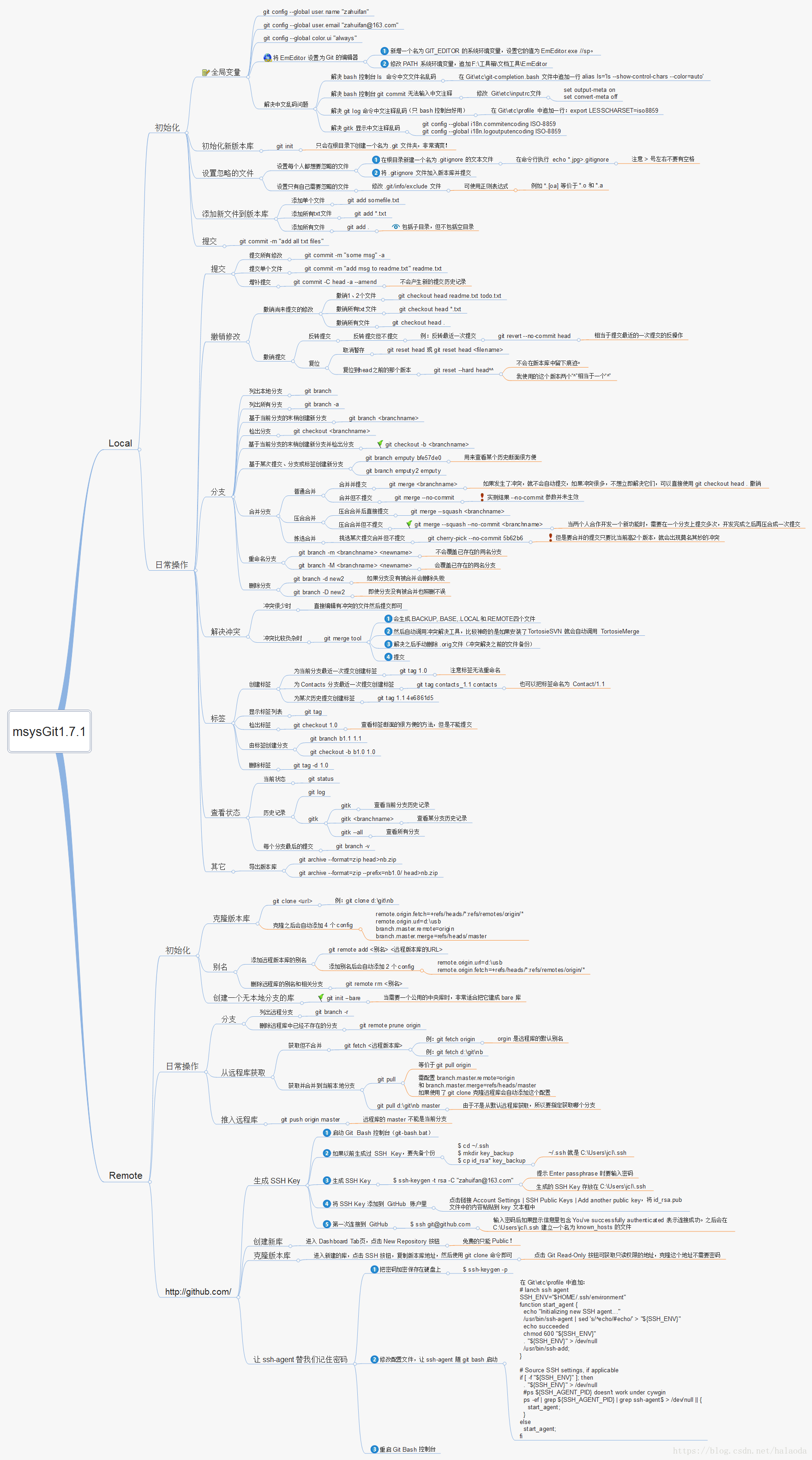
git常用命令速查
原地址:(Git 常用命令大全_道的博客-CSDN博客_git命令
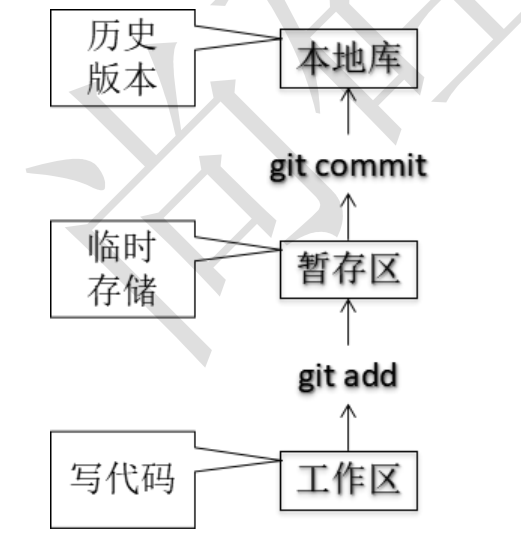
git结构
git基本命令
创建仓库
1
2
git init Initialized empty Git repository in /home/linux1/git/.git/
.git 目录中存放的是本地库相关的子目录和文件,不要删除也不要随意修改。
设置签名
形式:
用户:tom
Email地址:[email protected]
作用:区分不同开发人员的身份。这里设置的签名和登录远程库(代码托管中心)的账号、密码没有任何关系.
项目级别优先于系统用户级别,不允许二者均无。
1 2 3 4 5 6 7 8 9 10 11 12 13 git config user.name wangsheng git config user.email [email protected] cat ./.git/config [core] repositoryformatversion = 0 filemode = true bare = false logallrefupdates = true [user] name = wangsheng email = [email protected]
1 2 3 4 5 6 7 8 9 git config --global user.name wangsheng1 git config --global user.email [email protected] cd /home/linux1/ cat ~/.gitconfig [user] name = wangsheng1 email = [email protected]
查看状态
1
2
3
4
5
6
7
8
9
10
11
12
13
14
15
16
17
18
git status On branch master No commits yet nothing to commit (create/copy files and use "git add" to track) vim test.c git status On branch master No commits yet Untracked files: (use "git add <file>..." to include in what will be committed) test.c nothing added to commit but untracked files present (use "git add" to track)
提交文件
1
2
3
4
5
6
7
8
9
10
11
12
13
14
15
16
17
18
19
20
21
22
git add test.c git status On branch master No commits yet Changes to be committed: (use "git rm --cached <file>..." to unstage) new file: test.c git rm --cached test.c rm 'test.c' linux1@linuxone:~/git$ git status On branch master No commits yet Untracked files: (use "git add <file>..." to include in what will be committed) test.c nothing added to commit but untracked files present (use "git add" to track)
提交文件
1
2
3
4
5
6
7
8
9
10
11
12
13
14
15
16
17
18
19
20
21
22
23
24
25
26
27
28
29
30
31
32
33
34
35
36
37
38
39
40
git commit test.c my first commit git commit test.c [master (root-commit) c3a5dbd] my first commit 1 file changed, 5 insertions(+) create mode 100644 test.c git status On branch master nothing to commit, working tree clean git status On branch master Changes not staged for commit: (use "git add <file>..." to update what will be committed) (use "git restore <file>..." to discard changes in working directory) modified: test.c no changes added to commit (use "git add" and/or "git commit -a" ) linux1@linuxone:~/git$ git add test.c linux1@linuxone:~/git$ git status On branch master Changes to be committed: (use "git restore --staged <file>..." to unstage) modified: test.c git commit -m "此处填写提交信息" test.c [master 5844a4f] 此处填写提交信息 1 file changed, 3 insertions(+), 1 deletion(-)
版本穿梭
1
2
3
4
5
6
7
8
9
10
11
12
git log commit 5844a4f522fb8b50b71793ed80888995c4f45180 (HEAD -> master) Author: wangsheng <[email protected] > Date: Thu Feb 3 10:00:20 2022 +0000 此处填写提交信息 commit c3a5dbd770d1f255a11fda1f87299e1ba1892066 Author: wangsheng <[email protected] > Date: Thu Feb 3 09:43:47 2022 +0000 my first commit
为了更好进行版本穿梭,我们多次修改文件并提交
1
2
3
4
5
6
7
8
9
10
11
12
13
14
15
16
17
18
19
20
21
vim test.c linux1@linuxone:~/git$ git add test.c linux1@linuxone:~/git$ git commit -m "qwq" test.c [master d967874] qwq 1 file changed, 2 insertions(+) linux1@linuxone:~/git$ vim test.c linux1@linuxone:~/git$ git commit -m "复制1" test.c [master 688502c] 复制1 1 file changed, 1 insertion(+) linux1@linuxone:~/git$ vim test.c linux1@linuxone:~/git$ git commit -m "复制2" test.c [master 53a2912] 复制2 1 file changed, 1 insertion(+) linux1@linuxone:~/git$ vim test.c linux1@linuxone:~/git$ git commit -m "复制3" test.c [master c0ada25] 复制3 1 file changed, 1 insertion(+) linux1@linuxone:~/git$ vim test.c linux1@linuxone:~/git$ git commit -m "复制4" test.c [master 6d3b535] 复制4 1 file changed, 1 insertion(+)
1 2 3 4 5 6 7 8 9 10 11 12 13 14 15 16 17 18 19 20 21 22 23 24 25 26 27 28 29 git log --pretty=oneline 6d3b5356d60564d51d87600967c44971c0a1eb01 (HEAD -> master) 复制4 c0ada2579c3c309450609ce7d818ab1e4c6cacac 复制3 53a2912f51ffec27b3e6e4f81d8b20bf434e66d5 复制2 688502cfa68b3e3e71a96a471ee0b0238f8f6eb8 复制1 d967874fcd193bef504d8d91b6159fdbca75e94e qwq 5844a4f522fb8b50b71793ed80888995c4f45180 此处填写提交信息 c3a5dbd770d1f255a11fda1f87299e1ba1892066 my first commit git log --oneline 6d3b535 (HEAD -> master) 复制4 c0ada25 复制3 53a2912 复制2 688502c 复制1 d967874 qwq 5844a4f 此处填写提交信息 c3a5dbd my first commit git reflog 6d3b535 (HEAD -> master) HEAD@{0}: commit: 复制4 c0ada25 HEAD@{1}: commit: 复制3 53a2912 HEAD@{2}: commit: 复制2 688502c HEAD@{3}: commit: 复制1 d967874 HEAD@{4}: commit: qwq 5844a4f HEAD@{5}: commit: 此处填写提交信息 c3a5dbd HEAD@{6}: commit (initial): my first commit
git的版本控制本质即是控制head指针的移动
①基于索引值进行版本控制
1
2
3
4
5
6
7
8
9
10
11
12
13
14
git reset --hard 53a2912 HEAD is now at 53a2912 复制2 linux1@linuxone:~/git$ cat test.c int main { printf ("hello world" );printf ("yes" );printf ("asdads" );printf ("asdads" );printf ("asdads" );}
②通过 ^ 符号来进行版本回退
git reset --hard HEAD^
一个^表示后退一步,n 个表示后退 n 步
并且只能后退不能前进
1
2
git reset --hard HEAD^ HEAD is now at d967874 qwq
③通过 ~后退
git reset --hard HEAD~n
注:表示后退 n 步 只能后退
文件删除与恢复
前提:删除前,文件存在时的状态提交到了本地库。
操作:git reset --hard [指针位置]
删除操作已经提交到本地库:指针位置指向历史记录
删除操作尚未提交到本地库:指针位置使用 HEAD
1 2 3 4 5 6 7 8 9 10 11 12 13 14 15 16 17 18 19 20 21 22 23 24 vim aaa.txt linux1@linuxone:~/git$ git add aaa.txt linux1@linuxone:~/git$ git commit -m "aaa.txt" aaa.txt [master 03abfa2] aaa.txt 1 file changed, 2 insertions(+) create mode 100644 aaa.txt rm -f aaa.txt linux1@linuxone:~/git$ git status On branch master Changes not staged for commit: (use "git add/rm <file>..." to update what will be committed) (use "git restore <file>..." to discard changes in working directory) deleted: aaa.txt no changes added to commit (use "git add" and/or "git commit -a" ) linux1@linuxone:~/git$ ls test.c linux1@linuxone:~/git$ git add aaa.txt linux1@linuxone:~/git$ git commit -m "deleta aaa.txt" [master d929131] deleta aaa.txt 1 file changed, 2 deletions(-) delete mode 100644 aaa.txt
文件比较
git diff [文件名] 将工作区中的文件和暂存区进行比较
git diff [本地库中历史版本] [文件名] 将工作区中的文件和本地库历史记录比较
不带文件名比较多个文件
1
2
3
4
5
6
7
8
9
10
11
12
13
14
15
16
17
18
19
20
vim aaa.txt linux1@linuxone:~/git$ git diff aaa.txt diff --git a/aaa.txt b/aaa.txt index 2584198..7bfe159 100644 --- a/aaa.txt +++ b/aaa.txt @@ -1,2 +1,3 @@ hidsvdnscvdsnbsbcs dsvcseyhf +gvdhfvdsndvsefewhf linux1@linuxone:~/git$ git add aaa.txt linux1@linuxone:~/git$ git diff HEAD aaa.txt diff --git a/aaa.txt b/aaa.txt index 2584198..7bfe159 100644 --- a/aaa.txt +++ b/aaa.txt @@ -1,2 +1,3 @@ hidsvdnscvdsnbsbcs dsvcseyhf +gvdhfvdsndvsefewhf
分支管理
分支:在版本控制过程中,使用多条线同时推进多个任务。
创建分支 git branch [分支名]
查看分支 git branch -v
切换分支 git checkout [分支名]
合并分支
第一步:切换到接受修改的分支(被合并,增加新内容)上 git checkout [被合并分支名]
第二步:执行 merge 命令 git merge [有新内容分支名]
1
2
3
4
5
6
7
8
9
10
11
12
13
14
15
16
17
18
19
20
21
22
23
24
25
git branch ht_fix linux1@linuxone:~/git$ git branch -v ht_fix 03abfa2 aaa.txt * master 03abfa2 aaa.txt git switch ht_fix M aaa.txt Switched to branch 'ht_fix' vim aaa.txt linux1@linuxone:~/git$ git add aaa.txt linux1@linuxone:~/git$ git commit -m "ht-fix aaa" [ht_fix 7d0130e] ht-fix aaa 1 file changed, 2 insertions(+) linux1@linuxone:~/git$ git branch -v * ht_fix 7d0130e ht-fix aaa master 03abfa2 aaa.txt git switch master Switched to branch 'master' linux1@linuxone:~/git$ git merge ht_fix Updating 03abfa2..7d0130e Fast-forward aaa.txt | 2 ++ 1 file changed, 2 insertions(+)
远程仓库操作
创建远程仓库别名
git remote -v 查看当前所有远程地址别名
git remote add [别名] [远程地址]
推送
git push [别名] [分支名]
克隆
git origin [远程地址]
克隆作用:
完整的把远程库下载到本地
创建 origin 远程地址别名
初始化本地库
拉取
pull=fetch+merge
对于复杂的:
git fetch [远程库地址别名] [远程分支名]
git merge [远程库地址别名/远程分支名]
简单的直接pull
git pull [远程库地址别名] [远程分支名]
解决冲突
如果不是基于 GitHub 远程库的最新版所做的修改,不能推送,必须先拉
取。
拉取下来后如果进入冲突状态,则按照“分支冲突解决”操作解决即可。